

Skip to content
AI hero

Travel automation software for real operational workflows

Use connected iVector data and the intuitive Universal API to support practical automation, AI-assisted work and agentic workflows across real reservation processes. The same open foundation makes it faster to build and refine tailored operational tools as your needs change. 

What is travel automation?

Travel automation software takes repetitive, rules-based operational work and runs it through defined workflows instead of relying on manual effort. Within iVector, connected data and the intuitive Universal API can support automation, AI-assisted work and agentic workflows across real reservation processes.

Automation Runs defined, repeatable tasks through a consistent workflow, reducing the manual handling required.   
AI-assisted workflows Help people interpret information and prepare actions more quickly while keeping decisions under human control.   
Agentic workflows Carry out tested multi-step actions, with monitoring and human review focused on exceptions.  
Document

Turn repetitive operational work into controlled workflows

Operational updates arrive through emails, attachments, spreadsheets and messages. Teams spend time interpreting, rekeying and checking them, making this repetitive, rules-based work well suited to controlled automation. 

Reduce manual work 

Take on rules-based, repeatable work that consumes time, from data entry to routine updates. 

Improve consistency 

Apply the same defined rules each time, reducing variation from manual and ad hoc handling.

Respond faster

Act when an input arrives instead of waiting for someone to interpret and process it manually. 

Focus on exceptions 

Give specialists more time for exceptions, judgement calls and work that genuinely needs a person. 


How travel automation moves from input to action

Useful automation depends on connected, structured data and secure access to real operational workflows. iVector and the intuitive Universal API provide the foundation for information to move from an incoming input to a controlled, recorded action. 


1
Receive the input

An email, message, document or other operational input arrives in its original format. 

2
Read and extract

The workflow identifies and extracts the information needed to process the request.

3
Validate and match

The information is checked and matched to the correct record within the system of record. 

4
Act and record

The approved action is completed, confirmed and logged for a clear operational record. 

Move from co-pilot to automation at your own pace

Automation does not need to mean full autonomy from day one. Start with a co-pilot that drafts or suggests an action for a person to review and confirm.

As the workflow proves reliable on real inputs, defined tasks can move towards higher levels of automation, with human review focused on exceptions. You remain in control of how much is automated and how quickly.

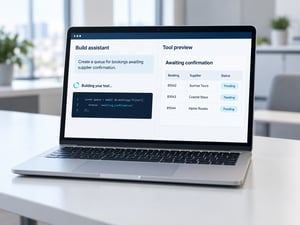
Build tailored travel tools with AI-native development

AI can support how new operational tools are designed and built, as well as how completed workflows are automated.

The intuitive Universal API gives developers structured access to iVector’s data, logic and operational processes. This creates a foundation for building smaller, tailored tools around specific business requirements.

Your development team can build these tools, intuitive can build them for you, or we can work together. The open architecture also makes it easier to test and refine new ideas as operational needs change.
AI image

Automated supplier stop-sales in practice

A practical example of how AI and automation can turn unstructured supplier communication into a controlled inventory update. 

From supplier message to inventory update 

Supplier stop-sale notifications can arrive through emails, messages, attachments and other unstructured formats.

The workflow reads and interprets the information, matches it to the relevant property, room and dates, and prepares the required inventory update through the intuitive Universal API.

Introduce automation with control 

The workflow can begin as a co-pilot, with a person reviewing each action. Once it has been tested against real supplier traffic and proven reliable, defined actions can be automated while the team continues to review exceptions. 

Build trust before increasing automation

Operational AI should be tested against real inputs before it is given greater autonomy. Accuracy must then be monitored continuously rather than checked once and assumed indefinitely.

Every automated action should also be logged and auditable, making it possible to see what happened, when it happened and on what basis. This gives teams the visibility to monitor performance, investigate exceptions and intervene when needed.

What else could be automated?

Automation can support different areas of travel operations, but each use case is at a different stage. 

Automated supplier stop-sales Supplier stop-sale processing is a practical current use case, turning unstructured supplier information into a controlled inventory update.  
Connected workflows Connected iVector data and the Universal API can support rate updates, quote repricing, amendments, invoice matching and reconciliation checks.   
Future operational applications The same foundation creates future opportunities for call-centre servicing, recommendations and other operational workflows shaped around your business.   

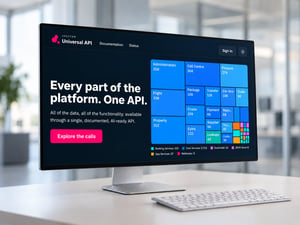
The Universal API is the foundation for AI and automation

iVector holds the reservation data, inventory, contracts and operational processes that AI-assisted tools and automated workflows need to understand.

The intuitive Universal API provides secure, structured access to approved iVector data, logic and capabilities. This enables tailored applications and automated workflows to work with the same operational information held within the reservation system.

Your developers can build these tools, intuitive can build them for you, or both teams can work together on the same open foundation.

universal-api-one-api-graphic 2
AI sep

Explore related iVector capabilities

See how iVector’s connected capabilities provide the data, workflows and operational depth that practical automation depends on. 

intuitive Universal API

Build AI-assisted tools and automated workflows using secure, structured access to approved iVector data and capabilities.

Explore the Universal API

Dynamic Packaging 

Connected supply, pricing rules and booking workflows come together to create and manage packages through iVector.

Explore Dynamic Packaging

Connectivity

Bring together the supplier and business systems that automated workflows depend on.

Explore Connectivity

Contracting & Inventory Management

Apply automation to inventory updates, rate changes and other repetitive contracting processes.

Explore Contracting & Inventory

Operations & Finance

Automate repetitive processes across fulfilment, amendments, cancellations, finance and post-booking operations.

Explore Operations & Finance

Reporting & MI

Monitor operational activity and measure the performance and impact of automated workflows.

Explore Reporting & MI

Measure the value of automation

Track operational measures that show whether automation is reducing effort, improving consistency and helping work move through the business more efficiently.

Time and effort Measure handling time, manual steps, turnaround time and the volume of work completed.  
Quality and control Monitor exception rates, errors, corrections and how often work needs to be repeated.   
Adoption and support Track how teams adopt and use each workflow, alongside the ongoing support needed to keep it working effectively.  

Start small and build on evidence

A practical route into automation begins with one repetitive workflow, clear controls and testing against real operational inputs.

1
Choose a workflow

Start with a rules-based process that consumes significant operational time.

2
Define the controls
Define the data, system access, approvals and exception handling the workflow needs. 
3
Test on real inputs
Run the workflow with a person reviewing every output before any action is completed. 
4
Monitor and expand
Track reliability and results, then increase automation where the evidence supports it. 

Frequently asked questions (FAQs)

Everything you need to know about travel automation, AI-assisted workflows and the intuitive Universal API.

What is travel automation software? Travel automation software takes repetitive, rules-based operational work, such as data entry, updates and confirmations, and runs it through defined workflows rather than manual effort.
What is AI-native development? AI-native development means building new tools and workflows with AI assistance from the outset, working directly against real reservation data and logic rather than a simplified test environment.
What is an agentic workflow? An agentic workflow can carry out multi-step actions autonomously once it's been proven reliable, moving from input to a completed action without requiring manual intervention at every step.
What is the difference between a co-pilot and automation? A co-pilot assists a person by interpreting information or preparing an action for review. An automated workflow can complete a defined action directly once it has been tested and proven reliable. intuitive’s model allows businesses to begin with human approval and increase automation at their own pace.
What can intuitive automate today? Supplier stop-sale processing is a current practical use case. The automated workflow can interpret unstructured supplier notifications, match the relevant information and prepare or complete the associated inventory update through the intuitive Universal API.
How does the Universal API support AI and automation? The intuitive Universal API exposes iVector's real data and workflows in a structured format, giving automated and AI-assisted tools something genuine to work with rather than a disconnected approximation.
Can customers build their own AI-enabled tools? Yes. Your own development team can build automation and tools directly against the intuitive Universal API, using your own operational knowledge of what needs automating.
Which use cases are roadmap versus live? Supplier stop-sale processing is the current live use case. The architecture can also support workflows such as rate updates, contracting data entry, quote repricing, amendments, invoice matching and reconciliation checks. Broader call-centre and operational applications should be described as future opportunities until their live status is confirmed.

Talk to our team

Discover which of your workflows could genuinely be automated. 

Free 15-minute consultation

Let our team guide you through what’s possible to automate.